
Best Desk Accessories That Are Actually Worth Buying in 2026
best desk accessories
Every "best desk accessories" list on the internet includes the same filler: novelty pencil holders, mini succulents, motivational quote plaques, and USB-powered cup warmers. Things that look good in a flat-lay photo but collect dust after a week.
This is not that list. Every accessory here solves a real problem — cable clutter, poor lighting, neck strain, dead phone batteries mid-day, or a desk that just doesn't work as well as it should. We've filtered out the gimmicks and kept only the best desk accessories that make a genuine, daily difference in how your home office looks and functions.
Whether you're building a setup from scratch around a new standing desk or upgrading an existing workspace, these are the accessories worth your money in 2025.
(Affiliate Disclosure: This post contains affiliate links, meaning we may earn a commission if you purchase through our links at no extra cost to you.)
Quick Picks: Best Desk Accessories by Category
| Accessory | Category | Why It's Here | Buy |
|---|---|---|---|
| BenQ ScreenBar | Lighting | Eliminates screen glare, saves desk space | Buy → |
| Logitech MX Master 3S | Mouse | Best ergonomic work mouse, period | Buy → |
| Orbitkey Desk Mat | Desk surface | Protects desk, adds grip, hides cables | Buy → |
| Anker 675 Docking Station | Connectivity | One-cable setup for laptops | Buy → |
| Twelve South Curve Riser | Monitor stand | Raises screen to eye level, storage underneath | Buy → |
| Yamazaki Cable Box | Cable management | Hides power strip and cables completely | Buy → |
| Moft Laptop Stand | Laptop ergonomics | Invisible adhesive stand, raises laptop angle | Buy → |
| Anker Wireless Charger | Charging | Keeps phone charged without cable clutter | Buy → |
Desk Lighting
1. BenQ ScreenBar Monitor Light — The Single Best Desk Upgrade
If you buy only one accessory from this entire list, make it this one. The BenQ ScreenBar is a LED light bar that clips onto the top of your monitor and illuminates your desk without any glare on your screen. It sounds simple — and it is — but the impact on your daily work experience is genuinely transformative.
Most home offices rely on overhead ceiling lights, which create shadows on your desk and glare on your monitor. Desk lamps take up surface space and often reflect off the screen. The ScreenBar eliminates both problems. It projects an asymmetric beam of light downward onto your desk and keyboard, lighting your workspace evenly while keeping the screen completely glare-free. The auto-dimming sensor adjusts brightness based on ambient light — brighter during the day, softer at night.
The adjustable color temperature (2700K warm to 6500K cool daylight) lets you match your lighting to the time of day or your preference. Warm light for evening work, cool daylight for focused daytime sessions. The touch-sensitive controls on top of the bar adjust brightness and temperature instantly.
It takes up zero desk space (it clips onto your monitor), draws power from a single USB port, and installs in 30 seconds with no tools. If you spend any time on video calls, it also dramatically improves your webcam image quality by providing even, front-facing light — better than any ring light at a fraction of the size.
Why it's worth it: Reduces eye strain, eliminates screen glare, improves webcam appearance, takes up zero desk space, auto-adjusts throughout the day. The rare best desk accessory that improves both health and aesthetics simultaneously.
★ #1 Pick — Shop BenQ ScreenBar on Amazon →Input Devices
2. Logitech MX Master 3S — Best Work Mouse
The MX Master 3S is the mouse that tech reviewers, designers, and remote workers unanimously agree is the best mouse for productivity work. It's been the default recommendation in its category for years because nothing else combines this level of ergonomics, features, and build quality.
The ergonomic sculpted shape supports your palm in a natural position that reduces wrist strain during long work days. The MagSpeed scroll wheel switches between precise click-by-click scrolling and free-spinning — flick it and it spins through a 1,000-line spreadsheet in seconds, then tap it to stop exactly where you want. It's the single feature that ruins every other mouse for you once you've experienced it.
The MX Master 3S connects to three devices simultaneously and switches between them with a button on the bottom. Work laptop, personal desktop, tablet — seamless switching without reaching for cables or dongles. The Logi Options+ software adds customizable gestures and app-specific button mappings that genuinely speed up workflows.
The "3S" in the name stands for the quieter click mechanism — 90% less click noise than the previous generation. Battery life is up to 70 days, and a one-minute USB-C charge gives three hours of use.
Why it's worth it: Ergonomic shape reduces wrist fatigue, MagSpeed scroll is addictive, multi-device switching saves time, near-silent clicks, 70-day battery.
Best Work Mouse — Shop MX Master 3S →3. Apple AirPods Pro (2nd Gen) — Best for Calls and Focus
This pick might seem out of place on a desk accessories list, but if you work from home and take video calls, the AirPods Pro have become the de facto work audio device for a reason. The active noise cancellation blocks apartment noise — traffic, neighbors, construction, barking dogs — letting you focus during deep work and hear clearly during calls. Transparency mode lets ambient sound through when you need to be aware of your surroundings.
The microphone quality is significantly better than any webcam mic and most headset microphones. Your colleagues hear your voice clearly with minimal background noise, even in noisy environments. The compact size means you can wear them comfortably for hours without the ear fatigue that over-ear headphones cause during back-to-back meetings.
For non-Apple users, the Sony WF-1000XM5 is the equivalent recommendation — similar ANC performance and call quality with better Android integration.
Why they're worth it: Noise cancellation transforms focus in noisy apartments, excellent call audio quality, lightweight for all-day comfort, seamless switching between devices.
Block Noise, Focus Better — Shop AirPods Pro →Desk Surface and Organization
4. Orbitkey Desk Mat — Best Desk Mat
A desk mat might seem unnecessary until you use a good one — then you can't imagine working without it. The Orbitkey Desk Mat is the one that convinced us. It's a premium vegan leather mat with a soft underside that grips your desk, a document-hiding flap at the top for quick-reference notes or passwords, and a magnetic cable holder built into the side that keeps your charging cables from sliding off the desk.
The surface is smooth enough for a mouse to glide effortlessly but has enough texture to keep paper from sliding. It protects your desk from scratches, coffee rings, and keyboard marks — especially important if you're renting or using a nice wooden standing desk you want to keep in good condition. The large size (36" × 18" or 27" × 14") defines your workspace and visually anchors your setup.
The hidden document flap along the top edge is genuinely useful — slide your daily to-do list, meeting notes, or login credentials underneath the flap where they're hidden from view but instantly accessible by lifting the edge. The magnetic cable holder keeps two cables positioned right where you need them.
Why it's worth it: Protects your desk surface, magnetic cable management, hidden document flap, makes any setup look more polished, smooth mouse surface.
Protect Your Desk — Shop Orbitkey Desk Mat →5. Ugmonk Gather Desk Organizer — Best Minimal Desk Organizer
Most desk organizers are plastic trays from an office supply store that look fine on day one and terrible by day thirty when they've become a catch-all junk drawer. The Ugmonk Gather takes a different approach — it's a modular, magnetic system of small wooden and leather trays that snap together in whatever configuration suits your desk.
The magnetic base means you can rearrange, add, or remove modules without committing to a fixed configuration. Start with a pen tray and phone stand, then add a card holder or catch tray later. The walnut-and-leather materials look premium without being flashy. The phone stand module holds your phone upright at a comfortable viewing angle for notifications, calls, or using your phone as a secondary screen.
Why it's worth it: Modular magnetic system adapts to your needs, premium materials, phone stand is genuinely useful, keeps your desk minimal without being empty.
Shop Ugmonk Gather — Modular Desk Organizer →6. Bellroy Desk Pouch — Best for Portable Workers
If you work from different spots — home desk, coffee shop, coworking space, kitchen table — the Bellroy Desk Pouch solves the problem of keeping your small accessories organized and portable. It's a slim, thoughtfully designed pouch that holds your charging cables, dongles, earbuds, USB drives, pens, and other small items that would otherwise scatter across your desk or bag.
The flat-opening design lets the pouch lay completely flat on your desk, turning it from a carrying case into an impromptu desk organizer. At the end of the day, you zip it up and drop it in your bag. Everything stays together, nothing gets lost, and your setup at the next location takes 30 seconds instead of five minutes hunting for cables.
Why it's worth it: Keeps accessories organized and portable, flat-opening doubles as desk organizer, saves time setting up and packing down, premium materials, eliminates the "where did I put my cable" problem.
Shop Bellroy Desk Pouch — For Mobile Workers →Monitor and Laptop Stands
7. Twelve South Curve Riser — Best Monitor Stand
If you use an external monitor or an iMac, it probably sits too low. Looking down at a screen that's below eye level causes neck strain that builds gradually over weeks until you realize your neck hurts every evening. The Twelve South Curve Riser raises your monitor by approximately 4.75 inches, bringing the top of the screen to eye level — the ergonomically correct position for your neck and posture.
The matte black aluminum construction is minimal and sturdy — it matches the aesthetic of modern monitors without adding visual clutter. The open-shelf design beneath the raised platform creates a useful storage space for a keyboard, notebook, or small accessories. It supports up to 50 lbs, covering any monitor or iMac, with non-slip pads on top and bottom preventing sliding.
Why it's worth it: Raises monitor to the correct ergonomic height, creates storage space underneath, premium aluminum build, supports heavy monitors. A simple fix for the neck strain most desk workers don't realize they have until it's gone.
Fix Neck Strain — Shop Twelve South Curve Riser →8. Grovemade Desk Shelf — Best Premium Monitor Stand
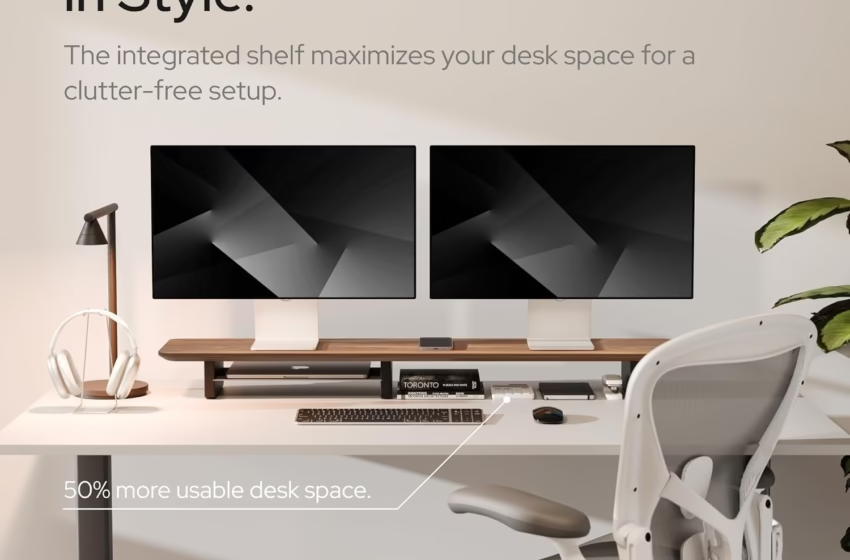
The Grovemade Desk Shelf is for people who treat their desk setup the way some people treat their living room — every piece matters aesthetically. It's a handcrafted solid walnut or maple shelf with machined aluminum or steel legs that raises your monitor while creating an organized display surface and hidden storage beneath.
Where the Twelve South Curve Riser is functional and minimal, the Grovemade is functional and beautiful. The solid wood top is a genuine furniture piece — each one has unique grain patterns, and the hand-applied finish feels warm and natural. It transforms a basic desk setup into something that looks intentionally designed.
Why it's worth it: Handcrafted solid wood elevates your desk aesthetic, raises monitor to eye level, creates organized storage, each piece is unique. The desk accessory people notice and compliment.
Shop Grovemade Desk Shelf — Handcrafted Walnut →9. Moft Laptop Stand (Adhesive) — Best Invisible Laptop Stand
If you work directly on a laptop without an external monitor, your screen is too low. You're looking down, your neck is bent forward, and you're developing the "tech neck" posture that leads to chronic pain. The Moft solves this by being essentially invisible — it's a thin, lightweight stand that adheres directly to the bottom of your laptop with a repositionable adhesive.
When folded flat, it adds less than 3mm of thickness — you won't feel it in your bag or know it's there. When you need it, fold it open in one second and it creates either a 15° or 25° angle, raising your screen by 2–3 inches. The adhesive is repositionable — you can remove and reattach it without residue. It supports laptops up to 16 inches and 18 lbs.
Why it's worth it: Always attached so you always have it, essentially invisible when folded, improves laptop ergonomics instantly, no setup time, lightweight. The best desk accessory with the highest value-per-dollar on this entire list.
Fix Tech Neck Instantly — Shop Moft Laptop Stand →Connectivity and Charging
10. Anker 675 USB-C Docking Station — Best All-in-One Dock
Modern laptops have two, maybe three USB-C ports. You need: monitor connection, keyboard, mouse receiver, external drive, phone charging, headphones, ethernet (maybe), and a webcam. The math doesn't work without a dock. The Anker 675 turns one USB-C cable into 12 ports — HDMI out, USB-A, USB-C, SD card reader, ethernet, audio jack, and a built-in wireless charging pad on top for your phone.
The key feature is the built-in 10W Qi wireless charging pad on the top surface. Your phone sits on top of the dock and charges throughout the day without a cable — eliminating one more wire from your desk. With a single USB-C cable from the dock to your laptop, your entire desk setup connects instantly. Plug in, and your monitor, keyboard, mouse, webcam, and phone charger all activate simultaneously. Unplug the one cable, and you're free to go.
Why it's worth it: One cable connects your entire desk setup, built-in wireless phone charger, 12 ports from one USB-C connection, compact vertical design. Eliminates the cable chaos of connecting multiple accessories individually.
One Cable, Everything Connected — Shop Anker 675 →11. UGREEN 9-in-1 USB-C Hub — Best Budget Hub
If you don't need the full 12-port docking station experience, the UGREEN 9-in-1 hub covers most needs at a fraction of the cost. It provides HDMI output (4K@60Hz), two USB-A ports, one USB-C data port, USB-C power delivery (100W pass-through charging), SD and microSD card readers, and a 1Gbps ethernet port — all in a compact, cable-attached hub that sits neatly beside your laptop.
The 100W power delivery pass-through is key — it charges your laptop through the hub while providing connectivity, so you're still down to just one cable to your laptop. It's the most practical hub for people who need more ports but don't want the desk commitment or price of a full docking station.
Why it's worth it: Covers 90% of connectivity needs at a budget price, 100W pass-through charging, 4K@60Hz HDMI, compact and portable, works with any USB-C laptop.
Budget Hub, 9 Ports — Shop UGREEN USB-C Hub →12. CalDigit TS4 Thunderbolt 4 Dock — Best Premium Dock
The CalDigit TS4 is the dock that professionals with demanding setups — dual 4K monitors, external storage arrays, audio interfaces, and multiple peripherals — rely on. With 18 ports including three Thunderbolt 4/USB-C downstream ports, 5 USB-A ports, DisplayPort 1.4, 2.5Gbps ethernet, SD/microSD, and 98W laptop charging, it handles anything you throw at it without compromise.
Where budget hubs and docks struggle with dual 4K monitors or bandwidth-intensive peripherals, the TS4's Thunderbolt 4 connection provides 40Gbps of bandwidth — enough for two 4K displays at 60Hz plus full-speed data transfer simultaneously. If you run a creative professional setup (video editing, music production, photography), this is the dock that doesn't create bottlenecks.
Why it's worth it: 18 ports, Thunderbolt 4 bandwidth for dual 4K, supports the most demanding professional setups, 98W laptop charging, compact metal design.
Pro-Grade Dock — Shop CalDigit TS4 →13. Anker PowerWave Wireless Charger Pad — Best Standalone Wireless Charger
If you don't need a full docking station but want to eliminate the phone cable from your desk, a standalone wireless charging pad is the simplest solution. The Anker PowerWave is a slim, circular pad that sits on your desk. Drop your phone on it, it charges. Pick it up, it stops. No plugging, no cable, no thought.
The pad supports up to 10W Qi charging for Android and 7.5W for iPhones (with MagSafe-compatible options available). An LED indicator confirms charging status. The rubber ring on top prevents your phone from sliding off. It's thin enough to slide under a desk mat if you want to hide it completely.
Why it's worth it: Eliminates the phone charging cable from your desk, dead simple to use, affordable, can be hidden under a desk mat, keeps your phone charged and ready all day without thinking about it.
No Cable, Full Charge — Shop Anker Wireless Pad →14. Anker 622 MagGo Magnetic Phone Stand — Best for iPhone Users
If you have an iPhone 12 or later with MagSafe, the Anker 622 MagGo is more useful than a flat charging pad. It magnetically snaps onto the back of your iPhone and includes a flip-out kickstand that holds your phone upright at a comfortable viewing angle while charging. Your phone becomes a secondary screen on your desk — visible for notifications, FaceTime, timers, or anything you'd normally check by picking up your phone.
The 5,000mAh battery bank also doubles as a portable charger — detach it from your desk stand position, and it's a MagSafe battery pack you can throw in your pocket. Two accessories in one.
Why it's worth it: MagSafe snap-on attachment is satisfying and instant, kickstand turns phone into a desk display, doubles as a portable battery bank, eliminates the phone charging cable.
MagSafe + Kickstand + Power Bank — Shop Anker 622 →Cable Management
15. Yamazaki Home Cable Management Box — Best Cable Hider
Cables are the single biggest reason clean desk setups look messy. You can have the best standing desk, ergonomic chair, and monitor — but a tangle of power cables, chargers, and adapters visible beneath your desk ruins the entire aesthetic. The Yamazaki cable management box is the simplest, most elegant solution.
It's a minimalist white or black box (Japanese design) that completely hides a power strip along with all the cables plugged into it. Cables enter and exit through slotted openings on each side. The lid lifts off for easy access when you need to plug something in. When closed, all you see is a clean rectangular box — the cable chaos is completely concealed.
The ventilation slots prevent overheating, and the size fits most standard 6-outlet power strips. It's a small detail that makes a disproportionate difference in how your workspace looks and feels.
Why it's worth it: Completely hides cable clutter, fits standard power strips, minimal Japanese design, makes any desk setup look 10x cleaner. The highest aesthetic-impact-per-dollar best desk accessory on this list.
Hide Cable Chaos — Shop Yamazaki Cable Box →Build Your Setup: Best Desk Accessory Combos by Budget
Not sure where to start? Here are three accessory combinations at different investment levels that give you the most impact for your budget.
| Tier | Buy These | Why |
|---|---|---|
| Essentials | BenQ ScreenBar + Moft Laptop Stand + Yamazaki Cable Box | Better lighting, better posture, cleaner desk — the three biggest improvements for the least money |
| Upgraded | Essentials + MX Master 3S + Orbitkey Desk Mat + UGREEN Hub | Better mouse, polished surface, resolved connectivity — the complete practical upgrade |
| Premium | Upgraded + Anker 675 Dock + Twelve South Riser + AirPods Pro | One-cable setup, perfect monitor height, noise-canceling focus — the complete setup |
Frequently Asked Questions
What is the single best desk accessory to buy first?
The BenQ ScreenBar. It improves eye comfort, reduces screen glare, enhances your webcam appearance, takes up zero desk space, and costs less than most other accessories on this list. No other single best desk accessory improves your daily work experience as much per dollar spent.
Do I need a docking station if I only use a laptop?
If you connect any external peripherals (monitor, keyboard, mouse, webcam), a dock or hub transforms your experience. Instead of plugging in 3–5 cables every time you sit down, you plug in one. The UGREEN 9-in-1 hub is the budget-friendly entry point. If you use a standing desk and dock/undock frequently, a full dock like the Anker 675 is a daily quality-of-life improvement.
How do I hide cables on a standing desk?
Three-step approach: first, use a cable management box to hide the power strip and adapter mess on the floor. Second, route cables through the cable tray built into most standing desks (check if yours has one — most do). Third, reduce the number of cables by consolidating through a docking station — the Anker 675 replaces 5+ cables with one. A desk mat with magnetic cable holders keeps remaining cables positioned neatly on the desk surface.
What desk accessories help most with ergonomics?
The three most impactful ergonomic accessories are a monitor stand or laptop stand to raise your screen to eye level (fixes neck strain), an ergonomic mouse to reduce wrist strain, and a monitor light to reduce eye strain. Combined with a proper ergonomic chair and the right keyboard, these accessories address the most common work-from-home pain points.
Are expensive desk accessories worth it or should I buy budget alternatives?
It depends on the category. For cable management and laptop stands, budget options work perfectly fine — you're paying for aesthetics at higher price points. For monitor stands, mice, and lighting, mid-range to premium options deliver genuinely better ergonomics and durability that justify the cost over time. For docking stations, the connection reliability and bandwidth of a quality dock saves you from the headaches of cheap hubs that disconnect randomly or can't drive displays properly. As a rule: spend more on things you touch or look at for 8+ hours daily.
Complete Your Home Office
Accessories are the finishing touches — but they work best on a solid foundation. If you're still building your home office setup, start with the big pieces first:
👉 Best Standing Desks for Small Apartments — The desk is the foundation everything else sits on.
👉 Best Ergonomic Office Chairs Under $300 — Your chair matters more than any accessory for long-term comfort.
👉 Ergonomic vs Mechanical Keyboard — The right keyboard transforms your typing experience.
👉 Best Webcams for Working From Home — Pair the BenQ ScreenBar with a quality webcam for the best video call appearance.
👉 Walking Pad vs Under-Desk Treadmill — Stay active at your new, accessorized desk.
👉 Quietest Mechanical Keyboards for the Office — A keyboard that matches the quality of your new accessories.
Found accessories you love? A well-accessorized desk doesn't just look better — it makes you measurably more comfortable and productive. Share this guide with someone whose desk setup could use an upgrade.